Do Shopify products need a SKU? What 181 stores do

No. Shopify's Help Center is direct about it: "SKUs aren't required, but consider using them for the following reasons" — and then lists inventory tracking, reporting, fulfilment and app integrations.
That answers the question and leaves the useful one open: if they are optional, how many merchants skip them? On 23 September 2026 we read the public product catalogue of 181 Shopify storefronts (6,473 products, 42,102 variants) and counted.
A third of products carry no SKU at all
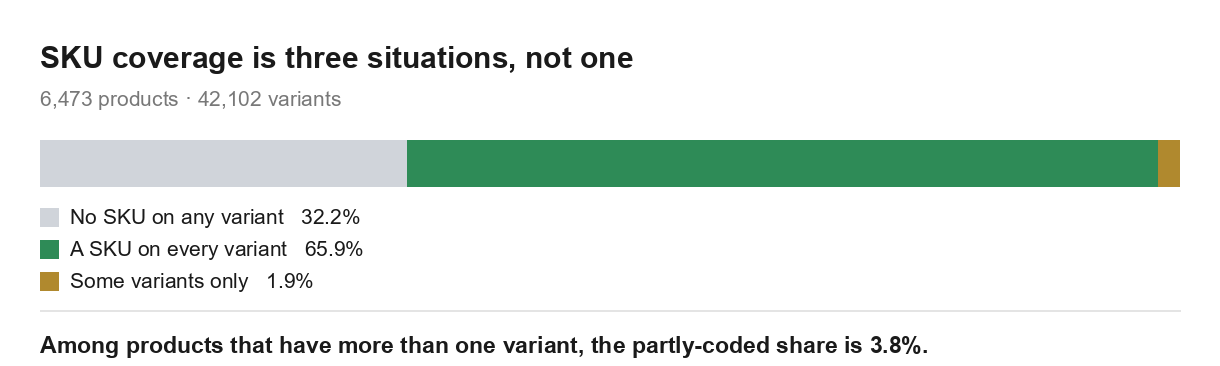
| Share of 6,473 products | |
|---|---|
| No SKU on any variant | 32.2% |
| A SKU on every variant | 65.9% |
| Some variants have one, some do not | 1.9% |
Those three are exclusive and add to 100%. The usual way to report this, as "67.8% of products have a SKU", hides the third row entirely.
One caveat belongs here rather than at the bottom of the page. We could read at most 50 products per store, and 107 of the 181 stores have more than that, so the table above leans on partial reads of the biggest catalogues. On the 74 stores whose catalogue we saw in full, the first row is 45.9% and the second is 53.6%. If your catalogue is small enough to see all of, that pair is the one that describes stores like yours. Both are below.
See what Arvio does with product data
Stores are in two camps, not on a spectrum
Counting stores instead of products shows something the pooled figure cannot. 73 of the 181 storefronts put a SKU on every product we read. 44 put one on none. Only 64 sit anywhere in between, and the median store is at 92.0%.

So this is not a habit that stores acquire gradually. It reads like a decision taken once — usually at the point where somebody starts doing inventory or connects a system that demands one — and then applied to everything. The Help Center is explicit about why: "Many apps and services require SKUs to sync inventory."
Which tells you what your own number means. If you are at 0%, you are with 44 other stores and nothing is broken. If you are at 60%, you are in the smallest group in this sample, and that is usually a sign of a migration or an import that went half-way.
Products with a SKU on some variants but not others
1.9% of all products have a SKU on some variants and not others. Among the 3,129 products that actually have more than one variant, that rises to 3.8%.
A product with no SKUs at all is visible: you notice it the moment you look. A product where the medium is coded and the large is not looks finished from every screen that shows one row per product, and only surfaces when a stock count, an export or a fulfilment handoff comes back short by one line.
If you are going to spend an afternoon on this, spend it on that row rather than on the third of products with nothing. Nobody decided those; they just happened.
One shortcut does not work, in case you were about to try it. We expected products that look unfinished — the ones whose only variant is Shopify's Default Title placeholder — to be the ones without codes, and checked. It goes the other way: 70.9% of them carry a SKU on at least one variant, a higher share than products that do have options, not a lower one. We did not test why, and the Default Title piece has the breakdown of what those products are. Treat it only as a reason not to use one as a proxy for the other.
How Arvio works across a whole catalogue
What to check on your own store
Open https://your-store.com/products.json in a browser. That is the endpoint we read — no login, and it is what any crawler already sees. It pages: ?limit=250&page=2 gets the next 250, and you keep going until a page comes back empty.
Find the partial ones first. For each product, compare how many variants it has against how many of them have a non-empty sku. Any product where those two numbers differ and neither is zero is on the 1.9% list.
Be realistic about that one. On forty products you can read the JSON. On four hundred you cannot, and there is no screen in the admin that does the comparison for you, so it is a short script or nothing. If you are not going to write it, skip this check rather than half-doing it — a partial pass over a partial-coding problem tells you less than no pass at all.
Decide about the rest as a group. Whether you need SKUs is a question about your operation, not about each product. If nothing downstream reads them, adding 400 codes is data entry with no reader.
Do not assume the codes are unique. Shopify's Help Center lists unique SKUs as a requirement in exactly one place — Shopify Fulfillment Network, where "unique SKUs are required for each product variant" — and elsewhere recommends them for accurate reporting. Recommended is not enforced. If your reports look strange, duplicates are worth ruling out. Broader catalogue clean-up after an import is covered in fixing a Shopify catalogue after an import.
When this is not worth your time
If nothing downstream reads them — one person, one location, no POS, no 3PL, no channel feed — then a SKU is a string you maintain for an audience of nobody, and Shopify's own answer to the title question is still no. If you are already at 100%, as 73 of the 181 stores we read are, there is nothing to do on this page. And if you are mid-migration, generating a set now just means reconciling two sets later.
Where this is worth doing is the middle case: a catalogue large enough that nobody can see all of it, with something downstream that will eventually ask.
What Arvio does here, and what it does not
Arvio reads the same fields and flags the products where the code is missing or inconsistent across variants, and holds anything it changes for your approval, with anything you let through undoable afterwards. What it will not do is invent a coding scheme for you. A SKU format is a decision about how your operation refers to its own stock, and nothing in a catalogue read can tell you what yours should be.
What we cannot tell you is whether any of this affects sales. We counted coverage. Whether coding a catalogue sells more of it is a different question and one read of public catalogues does not answer it.
Check your own catalogue with Arvio
FAQ
Do Shopify products need a SKU?
No. Shopify's Help Center states it plainly: "SKUs aren't required, but consider using them for the following reasons", and the reasons it gives are inventory tracking, reporting accuracy, fulfilment and third-party integrations. The one place it does require them is Shopify Fulfillment Network, where unique SKUs are required for each product variant.
Do small businesses need SKUs?
The size of the business is the wrong variable. What matters is whether anything reads them — a POS, a warehouse, a 3PL, a channel feed, a reporting tool. In our sample 44 of 181 storefronts ran with none at all, so plenty of stores operate without.
What is a SKU in Shopify?
An internal code on a variant, not on a product: a product with six variants has six SKU fields. It is used for tracking stock and reporting on sales, and it is yours to format — Shopify's guidance is to avoid special characters, spaces, and characters that are easy to confuse like 0 against O.
What is the difference between a SKU and a barcode?
Shopify's documentation separates them directly: "SKUs are different from barcodes and are used for different purposes." A SKU is your internal code; a barcode is an external identifier. You can use both on the same product, in their own fields. We can only report SKU coverage here, because the public endpoint we read does not expose barcodes at all.
Does Shopify require SKUs to be unique?
Only for Shopify Fulfillment Network, per the Help Center. Elsewhere it recommends unique SKUs on the grounds that sales reports and analytics work best that way — a recommendation, not a constraint the platform enforces.
How do I add SKUs to many products at once?
Export the products to CSV, fill the variant SKU column, and import it back. The thing to get right is that the column is per variant, not per product, so a product with six variants occupies six rows and needs six values.
How do I find products that are missing a SKU?
Compare each product's variant count against how many of its variants have a non-empty SKU, as described above. Products where one number is zero are easy to spot anywhere. Products where the two numbers merely differ are the 1.9%, and they are the ones worth building the check for.
How we measured this
The sample frame is the Shopify Community "Store Feedback" board, where merchants post their own store URL and ask strangers for a review. We read the first post of 600 threads, posted between March 2025 and September 2026, and took every linked hostname, dropping the community's own domain, Shopify's, image hosts, social networks and link shorteners. That left 406 candidate domains. We then requested /products.json?limit=1 from each one and kept the 185 that answered with valid Shopify product JSON. The other 221 are the frame's largest bias and they are worth naming: 114 did not resolve at all, 53 returned HTTP 404, 26 returned HTTP 402 — the code Shopify serves for a frozen unpaid store — 10 returned 401, 11 answered with something that was not JSON, and the remaining 7 failed in other ways. So this is a sample of the stores that were still trading on the day we read, drawn from a board where people post when they need help. That verification ran on 22 September. The catalogue read itself happened the next day, 23 September: one pass per store, from the same public endpoint, up to 50 products each. Two of the 185 that had answered the day before did not answer this time — one HTTP 402, one HTTP 500 — and of the 183 that did, two carried no products at all. That leaves the 181 storefronts and 6,473 products here.
A SKU counts as present when the field is non-empty after trimming whitespace. We did not check the format, and we did not check for duplicates.
This is the same read as the Default Title variant piece; the same 181 storefronts, counted on a different field.
What this doesn't show
- We read up to 50 products per store, and 107 of the 181 hit that ceiling. Excluding those stores moves every headline here, and moves the main one a long way: on the 74 stores we saw in full, products with no SKU on any variant rise from 32.2% to 45.9%, products with a SKU on every variant fall from 65.9% to 53.6%, and the median store drops from 92.0% to 50.0%. The two-camp shape survives — 28 of those 74 stores are at 100% and 29 at zero — but the balance between the camps does not. The stores we could only see one page of are the ones with SKUs.
- The partial row shrinks too, for a mechanical reason. It goes from 1.9% to 0.5%, and among multi-variant products from 3.8% to 0.9% — the stores we saw in full carry fewer multi-variant products, and a product with one variant cannot be partially coded.
- This is not a random sample of Shopify. It is a public, reproducible convenience frame. Merchants who post asking for feedback skew newer, smaller, and more likely to be struggling. Anyone can rebuild the same list from the same board, over the same date range, with the same rule.
- Present is not correct. We counted whether the field has something in it. We did not test whether the codes are unique, consistent, or mean anything.
- The public endpoint does not expose barcodes. Everything here is about SKU coverage and nothing beyond it.