How to audit a Shopify store

Published 1 September 2026 by Adot Technologies Inc, the team behind Arvio, a Shopify app. Every number we report about our own store below we measured on 31 August 2026 — the publication date and the measurement date are two different things, and telling them apart is the first habit this article asks of you. Measured with anonymous read-only requests to the public pages of a store we own: no app, no admin, no account. Four of the six you can run on your own store while you read. The other two need a spreadsheet once your catalogue is past a hundred products.
Key takeaways
- The order is the point. The checks are numbered 1 to 6 because each one reads a page the one before it sends people to. What check 2 finds changes how you should read check 3.
- A finding comes with its measurement. "Improve your product pages" is advice. A count you can go and recount is a finding.
- Six checks, and four of them are minutes in a browser. Every one is below with its URL and what a pass looks like.
The six checks
| Check | Where you run it | A pass looks like | |
|---|---|---|---|
| 1 | Does your title match your catalogue? | homepage <title>, then a glance at /products.json |
the title names what you actually sell |
| 2 | Are your categories usable? | /products.json → product_type |
zero products with an empty product_type |
| 3 | Do your URLs still match your titles? | /products.json → title vs handle |
zero handles that share no words with their title |
| 4 | Is the cart reassuring? | /cart with an item in it |
the words you use for returns and security are in the cart page's own text, above the footer |
| 5 | Which policy pages are you linking? | your footer's links | a refund and a shipping policy are reachable from the front page |
| 6 | Can a customer find their order? | /pages/track-your-order, /pages/order-status, your homepage text, both contact spellings |
an order-lookup route or a homepage link to one — and both spellings of your help page resolve |
Checks 4, 5 and 6 are a few minutes each in a browser, and check 1 is too — it only needs a glance at the product types, not a count of them. Checks 2 and 3 are different: they are aggregations over your whole catalogue. At 69 products you can eyeball the JSON. At 400 or 4,000 you need to paste it into a spreadsheet or run a few lines of script — the counting is trivial, but it is not something you do by scrolling. Budget an hour the first time if your catalogue is in the hundreds — that is our estimate of the work, not something we measured.
Below, each one in full, with what it returned on our store.
Why the order matters
A shopper does the same six things in the same order. They land, they browse, they open a product, they add it to a cart, they check out, and then they wait for a parcel.
If your category pages are unusable, the conversion rate of your product pages is being measured on the small self-selected group who got past the categories anyway. Fix the product page first and you have optimised for survivors. That order describes the journey, not every entry point — if most of your traffic is paid and lands directly on product pages, stage three is where those visitors start, and that is where you should start reading.
At each stage the question is the same: what can you measure from outside, with no app and no admin access?
Check 1 — landing: does the title match the catalogue?
Run it. Open your homepage, view source, read the <title>. Then open yourstore.com/products.json and look at what the product_type values say. If the title leads with words that do not appear in that list, the traffic you buy is landing on the wrong stock.
⚠️ Shopify caps that endpoint at 250 products per page — that limit is the platform's, not something our 69-product catalogue could show us. Add ?limit=250&page=2, &page=3 and so on until a page comes back short. Our catalogue is 69 products and came back on one page; if yours is 400 or 4,000 and you read page one only, every count you take from it is a floor.
Ours. The title is:
Hearth & Craft
 – Hearth & Craft
The shop name, a dash, then the shop name again. Nothing about serveware, table linen or kitchenware, which is what the catalogue is. A shopper arriving from a search result for "wooden serving board" sees a title that could belong to any store on the platform.
This check has no size component, and that is deliberate. We measured our homepage at 242,943 bytes uncompressed and 42,622 on the wire (repeat fetches vary by well under one percent), but we have no defensible threshold for either number, and neither does anyone who has not measured your theme. So there is nothing here for you to pass or fail. Both figures come back in Method, where they are what our own tool's number gets compared against.
The automated version of the six checks below
Point it at your storefront and it runs a version of this for you — read-only, no account, no app install, and each finding prints the evidence line it came from. Read them as leads and open the page behind each one; the method section below is us doing exactly that, ten times.
Check 2 — browsing: are the categories usable?
Run it. From the same /products.json, collect every distinct product_type and count the products under each. You are looking for two different things: the same category spelled more than one way, and products carrying nothing at all.
Ours.
product_type |
products |
|---|---|
| Serveware | 21 |
| Table Linen | 11 |
| Kitchen | 8 |
| Storage | 4 |
| Drinkware | 3 |
| Tabletop | 2 |
| Barware | 1 |
| (empty) | 19 |
Seven values — and they are seven different categories, not one category spelled seven ways. Print the values before you believe any count of them. A tool that only counts distinct values will call this taxonomy fragmented, and acting on that means merging Barware into Drinkware because a counter said seven was too many.
The finding is the other half: 19 of 69 products carry no product_type at all. More than a quarter of the catalogue cannot appear in any filter or automated collection built on that field, and no amount of theme work changes that.
Check 3 — product pages: do the URLs still match the titles?
Run it. In /products.json, compare each product's title to its handle.
Be explicit with yourself about the comparison rule, because different rules give very different answers. Two we ran:
- Shares no words at all with its title — the strictest reading.
- The handle's first word does not appear in the title — looser, catches products whose URL leads with someone else's name.
Ours. First, an incidental observation while the file is open — it has no pass mark and is not part of check 3. Images per product:
| images | 1 | 2 | 3 | 4 | 5 | 6 | 7 | 9 | 10 |
|---|---|---|---|---|---|---|---|---|---|
| products | 52 | 4 | 2 | 4 | 2 | 1 | 1 | 1 | 2 |
56 of 69 products carry fewer than three images. We are not going to tell you three is the number — how many a shopper needs depends on what you sell, and anyone quoting you a universal figure has not measured your category. What the distribution does tell you is that this store has one photograph of most things, which is a decision nobody made on purpose. Note it and move on; the check is below.
The check itself. The strict rule returns two products:
Randers Wine Rack          → footed-stoneware-butter-dish-xtra-large
Herning Round Crumb Catcher → footed-stoneware-butter-dish-medium
The looser rule returns four, adding Silkeborg Serving Spoon Set → kolding-serving-spoon-set-medium and Acacia Round Tray → square-acacia-round-tray.
Two and four, from the same catalogue, on the same day. Neither is wrong; they answer different questions. If a tool hands you a single number here without telling you which comparison it made, you cannot act on it, because you do not know what it found.
The URL mismatch is the one worth pausing on, because nothing puts it in front of you. Your product list shows titles; the handle sits one click away in each product's URL field, and nobody opens 400 of those. The URL only shows itself to the customer, the crawler, and whoever pastes the link into a chat.
This check cannot tell you how the URLs got that way. On a live store a mismatch is usually a title edited after the URL was set. Ours is a dev store whose catalogue was loaded from a file, and a wine rack sitting at a butter dish's handle is what a bad import looks like, not a rename. Either way you are left with a URL that no longer describes its product, and either way you have to open the products to see which.
Check 4 — the cart: is the reassurance where the worry is?
Run it. Open yourstore.com/cart with an item in it and read the page as text — Ctrl+F the rendered page, not the source. Search for returns, refund, exchange, secure, and whatever wording you use to promise you will make it right. Not in the footer: in the part of the page a person is looking at while deciding.
Ours — and the reason this one has to be run by hand. Fetched anonymously, /cart returns HTTP 200 and 188,553 characters of HTML, but only 1,008 characters of visible text, and it opens "Your Shopping Cart … Your cart is empty". None of the reassurance words appear, and that tells you almost nothing, because an anonymous request has no session and therefore no cart.
A cart page with a line item in it is a different document from the one a crawler sees, and it is the one where the reassurance either sits next to the checkout button or does not. Thirty seconds in your own browser will tell you which. Nothing we run can.
Check 5 — checkout: which policy pages are you linking?
Run it. Look at your footer links and sort them into two piles. Shopify's own policy pages live at /policies/refund-policy, /policies/privacy-policy and so on, and those are the ones checkout itself shows. Pages you built by hand live at /pages/…. A store can have both, with different text in each, and only one of them is what a customer sees at the moment of paying.
Ours. The homepage links exactly two policy or help pages of any kind: /policies/privacy-policy and /pages/contact. There is no refund policy link and no shipping policy link anywhere on it. So a shopper deciding whether to buy cannot reach the returns terms from the front page at all, and the delivery promise that would normally sit alongside the shipping policy does not exist to be compared against anything.
Write down that you looked. "Checked, nothing wrong" and "never checked" leave the same blank space — in your own notes as much as in anybody's report.
Check 6 — after the order: can a customer find their order?
Run it. Try yourstore.com/pages/track-your-order and yourstore.com/pages/order-status. Then load your homepage as rendered text and search it for track and order status. Then try both spellings of your help pages: /pages/contact and /pages/contact-us.
Ours.
| URL | |
|---|---|
/pages/track-your-order |
404 |
/pages/order-status |
404 |
/pages/contact |
200 |
/pages/contact-us |
404 |
/pages/faq |
404 (we tried it too — same missing-page pattern, no separate check) |
Neither tracking URL exists, and the words track and order status appear nowhere in the homepage's 1,479 characters of visible text. So every "where is my order" arrives as a message to a human.
And one spelling of the help page works while the other 404s. That is the cheapest fix in this list: a redirect. Whether anything is actually pointing at the broken spelling is a question for your own Search Console and server logs; a storefront audit cannot see inbound links, so treat the 404 as a thing to fix rather than as evidence that traffic is being lost.
What a storefront audit cannot see
It cannot see your admin. Everything above came from public pages: no orders, no customers, no draft products, no unpublished changes.
It cannot see Google. It measures what you serve. Whether Google kept those pages is a Search Console question.
It cannot see behaviour. Nothing here measures whether a shopper actually left. These are structural problems with plausible mechanisms, not attributed losses. Anyone converting a finding like this into a revenue figure is making it up.
And one that belongs to automated audits, not to the six checks above. Nothing in the output flags it: they sample in two places, at different rates. Checks 1–3 as you run them read every product in /products.json. A tool also opens individual product pages, and it opens far fewer — ours opened three. On a catalogue in the thousands both layers sample, and both counts come back short. When you run the six yourself you only have the first layer, which is the one that is easy to make complete.
You have the six answers. Here they are without the browser tabs
The same six stages run automatically against your public storefront, with the measurement behind each finding so you can check the work — which, as the method section shows, you should.
What to do once you have the answers
- Read the measurement, not the headline. If you cannot see what was counted, you cannot act on it and you cannot catch it when it is wrong.
- Check anything you would act on. Open the page. Your page source outranks any scanner, including ours.
- Sort what is left by how much deciding it needs, not by how severe something looks. The 19 empty
product_typevalues need a value each and the work is in the doing. How many images your products need is a decision, and so is which category name survives a merge. - Re-run afterwards. The value of the second run is the diff. Read the two-run comparison in Method first, though, because ours did not return the same set twice.
If all six come back clean and the original symptom is still there — traffic arrives and nobody buys — that is a different diagnosis. The checks above are how you rule this one out before spending a week on the other.
We make a free tool that runs a version of this automatically, and you can point it at your own store — no app, no admin access, no account, the same conditions as the six checks above. Read what it gives you as leads rather than verdicts, and here is why, measured: we ran it on this same store while writing and went through its ten findings one by one. Four held, five did not, and the tenth we set aside without checking — the accounting is in Method, finding by finding. Seven defects came out of that: those five, plus two gaps in the report's format, and none of them is fixed yet. So open the page a finding names before you act on it. That is the same instruction as check 2 above, and it is the one thing that separates a lead from a bill of work. What we sell is Arvio, which fixes catalogue problems like these across a whole store.
What the automated version looks like
The same six stages exist as the free audit linked above. The next section takes it apart finding by finding, so here first is what it actually does, screen by screen, on the same store.
What you give it. A domain. There is no account step and no install step, and it never opens a Shopify admin — it reads the same public pages you read in checks 1 to 6.

What comes back first. A score, the stage that came out weakest, and four counts. This is our store, the one every number above was measured on.

Read the small line before the big number. Read from your public storefront only is the same boundary checks 1 to 6 work inside, and it is what tells you the report has not seen an order, a customer or anything else behind the admin. It is also the line that makes the score recountable in principle: everything under it came from pages you can open yourself.
Then read the count on the right: 10 Arvio can fix. That is the report talking before any of the rechecking below, and five of those ten did not survive it. It also flattens two different things into one number — in the data underneath, six of the ten are marked as changes the tool would make on its own and four as changes it would draft for a person to approve, and the screen does not say which is which. Both of those are on the defect list at the end of this article.
Then the stages, in the order a buyer meets them — the same six as the table at the top of this article.

Then the findings. Each is a sentence, a severity, an area, and — the part that decides whether it is any use — the evidence line underneath. Here is one from our store that we rechecked and that held:
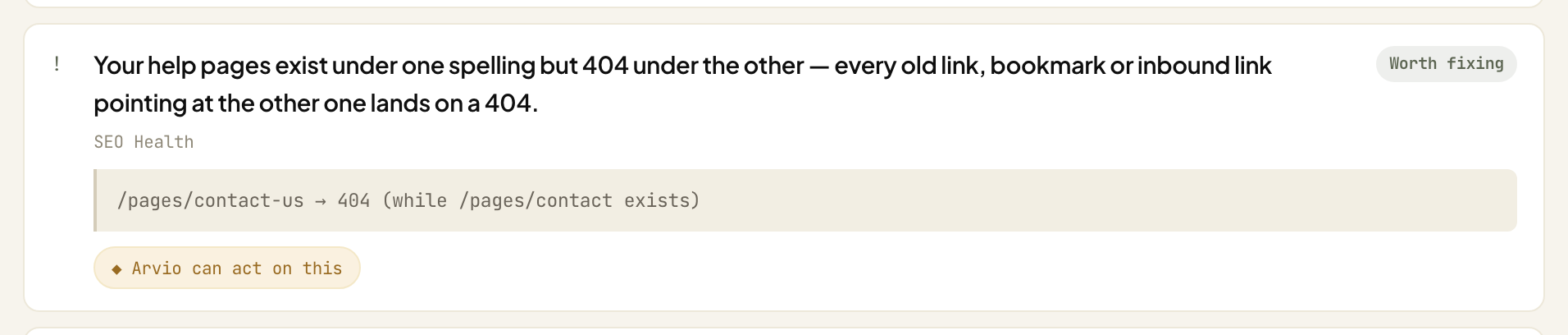
That evidence line is the whole thing. You paste /pages/contact-us after your domain and you have settled it in five seconds. We did, and it 404s while /pages/contact resolves — which is check 6, arrived at from the other direction.
And here is one that did not hold:
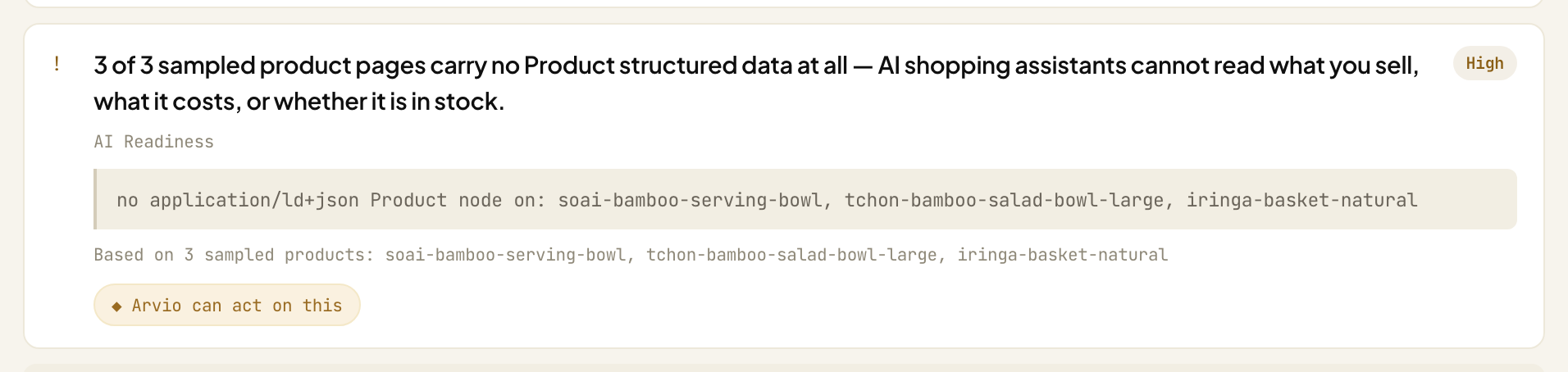
Same shape, same confidence, three named handles. All three of those pages return HTTP 200 and carry Shopify's own Product JSON-LD, which you can confirm by opening any of them and searching the source for "@type":"Product". The evidence line is what let us find that out — and it is also what the finding got wrong. Note the word sampled: three product pages, on a catalogue of 69. That is the second sampling layer described above, and on a larger catalogue it is the one that comes back short.
So: read the sentence, then read the line under it, then open the page. The next section is us doing exactly that, ten times.
Method
The store. fashionmore-3397.myshopify.com, 69 products. The .myshopify.com subdomain is left over from how the store was created; the shop is named Hearth & Craft, which is why the two do not match. It is a development store we own, its catalogue was loaded from a file rather than built up by a merchant, and it is publicly readable — so you can re-run everything above against it, which is the point of publishing it.
One caveat, and it is the same one this article keeps making about dates. It is a live store and the catalogue moves, so re-running it today will not hand you the counts in this article, and it should not. We re-read it on 14 September 2026: it was down to 67 products, Serveware to 19. What did survive two weeks is the part that matters — the <title> is still the shop name twice, 19 products still carry no product_type, and both of the URL mismatches below are still there, word for word. What you should be able to reproduce here is the method and the structural findings, not the arithmetic of one afternoon.
How. Anonymous read-only HTTP GET, no cookies, no login, no app. /products.json was read with ?limit=250&page=N until a page came back short. Where we quote "visible text" — 1,479 characters for the homepage, 1,008 for the cart — that is the raw document with <script>, <style> and <noscript> blocks removed, tags stripped, HTML entities decoded and whitespace collapsed. Skip the entity step and you will get 1,506 and 1,031 instead. It is not a rendered DOM. For a Liquid theme the two are close, and the homepage figure includes the footer (the footer's own words privacy, terms and contact all survive into it, though only two of the three are links), which is what makes "track appears nowhere" a statement about the page rather than about our extractor. If your theme renders its footer client-side, run this one in the browser instead.
n = 1. One store, chosen because we own it. A 69-product catalogue is small and several of these scale differently in the thousands.
We also ran our own free audit on this store and then checked its findings against the work above. Two runs, 44 minutes apart, finished at 10:11 and 10:55 UTC on 31 August 2026, with nothing touched on the store in between — the first returned seven findings, the second ten. The first run's seven are a strict subset of the second's ten; nothing disappeared, three things appeared. (We saved the two runs from two different response shapes: for the first, the status wrapper, which carries a start time, a finish time and the breakdown of where each page was fetched from; for the second, the finished report, which carries none of those. That is why we can quote a duration and a source split for the first run and not the second. Both carry the same score, stages, findings and unchecked lists, so the two runs are directly comparable.)
Here are all ten of the second run's findings and how each one fared. Four held. Five did not. One we set aside without checking, for a reason given below — and the difference between that last one and the other five is exactly the distinction check 5 is about.
| Finding | Held? | |
|---|---|---|
| 1 | Homepage title does not match the catalogue | ✅ the title is the shop name twice |
| 2 | Homepage document is 707 KB | ❌ we measure 242,943 bytes |
| 3 | 7 distinct category spellings | ❌ headline — they are seven real categories |
| 4 | 81% of products have one or two images | ✅ our count matches exactly |
| 5 | 8 product URLs no longer match their titles | ❌ we cannot reproduce the 8 |
| 6 | Three product pages carry no Product structured data |
❌ all three carry it |
| 7 | No returns or security wording in the cart page text | ❌ measured on the empty cart |
| 8 | No self-service order lookup | ✅ both URLs 404, nothing on the homepage |
| 9 | Help pages exist under one spelling, 404 under the other | ✅ reproduced |
| 10 | Nothing on the store answers a shopper question in plain sentences | — set aside, see below |
And the numbers that came back with them: 90 out of 100, then 86.
The first run returned seven of the ten above — rows 1, 3, 4, 5, 7, 8 and 9 — everything except rows 2, 6 and 10. So the 90 sat on top of those seven, and by the same rechecking, four held (1, 4, 8, 9) and three did not (3, 5, 7). Forty-four minutes later, with nothing touched on the store in between, the same audit scored it 86. Per stage the second run reads 83, 88, 71, 95, 100 and 78 — the six checks above, in that order.
Same store: the homepage title is the shop name twice. The order-tracking URL 404s, with nothing on the homepage pointing anywhere else. The contact page 404s under one of its two spellings. 19 of 69 products carry no category at all. The report found each of those itself, and still printed a 90.
A 90 is not a thing you can do anything with. You cannot recount it, and it gave no sign that three of the seven findings beneath it would come apart in an afternoon. It does not hold still either: nothing about the store changed between the two runs, and the score moved four points anyway. That is why this article is built out of counts: every check above ends in a number you can go and take again.
Note that finding 3 splits: the count of distinct values is right and the second half of its evidence line, 19 products with no category, is the finding we used in check 2. It is the headline that does not hold, so we have counted it as not holding.
Why each of the five did not hold, and why the tenth is set aside:
- 2 — the byte count. We measure about 243 KB uncompressed (242,839–244,027 across three fetches) and 42,622 bytes on the wire; compression does not account for the gap. We think it measured a rendered DOM, when its own wording says it measured the document, but we have not confirmed that and will not argue from the figure until we have.
- 3 — "spellings". Seven real categories, as the table in check 2 shows. Counting distinct values does not tell you whether two of them mean the same thing.
- 5 — the 8. The two rules we could state give 2 and 4. Here are the three examples it printed:
Randers Wine Rack             → footed-stoneware-butter-dish-xtra-large
Silkeborg Serving Spoon Set   → kolding-serving-spoon-set-medium
Rattan Salad Bowl - 12" Round → rattan-salad-bowl-14-x-10
The second and third share three words each with their handles, so its rule is neither of ours — and it is not written down anywhere in the output.
- 6 — the structured data. All three pages return HTTP 200 with Shopify-generated
ProductJSON-LD: 21, 14 and 5Product/Offerpairs. The firstProductnode in each sits at character 139,220, 133,530 and 124,485 of documents 327,037, 309,290 and 242,521 characters long, so the reader stopped short of all three. Its limit is therefore below 124,485 characters, and it was measuring that rather than the store. We have made this exact error before, on ourselves, where it turned 95% into 33%. - 7 — the cart. True of the empty cart page it read, which is the only one an anonymous fetch can get, and not a statement about the page the finding is about.
- 10 — answerable content. We did not check this one. It runs on the same reader as 6, over the same oversized pages, so we have reason to doubt it — but reason to doubt is not a recheck, and we are not going to file it under "did not hold" as though we had done the work. It is set aside until the reader is fixed.
And one thing that is not a finding at all. The checkout stage reported partial and listed what it had not checked, with a reason. What it has no list of is what it checked and found clean. So the policy-surface check named in check 5 is unaccounted for: we cannot tell from the output whether it ran. That is a gap in the report's format rather than a wrong finding, which is why it is not one of the ten.
And a second gap, in the wording above that same list. The heading it prints over anything it skipped reads we could not reach the data these needed. Our run skipped three checks, and the reason it recorded against each one was none of those words: "only 1 collections — too small a sample", "the sampled products have no apparel/footwear size option — a size chart does not apply", and, for the delivery-promise check, that neither the homepage nor the shipping policy states a comparable delivery window. Could not read it and did not need to read it are different answers, and the heading gives the first one for all three.
None of the seven is fixed as of 31 August 2026 — the five findings above, plus the two format gaps in the paragraphs before this one. All six are written up and handed to the people who can fix them, but nothing above has shipped, and we are not going to write "in hand" and let you assume otherwise. That is what "leads rather than verdicts" above is about: the link is there, and so is this list of what it got wrong on the one store we can check it against.
One more thing about the word "we". Not every page was fetched by us directly. The first run recorded 11 sources, 6 fetched directly and 5 through a third-party page-fetching service we use for pages our own fetcher cannot get cleanly. Those are your public pages either way and you never gave us credentials to send, but the request is not always ours. The six checks above need nobody but you.
FAQ
What is a Shopify store audit?
A structured read of your storefront that reports specific, checkable problems with the buying journey, with the measurement behind each one. A good one runs against your actual catalogue and pages. A score by itself is not an audit.
How do I audit my Shopify store myself?
Run the six checks in the table above. Checks 1, 4, 5 and 6 need nothing but a browser: your homepage source, your cart page with an item in it, your footer's policy links, and a few URL guesses for your help and order-tracking pages. Checks 2 and 3 read your public /products.json (paginated, 250 per page) and count across the whole catalogue — past about a hundred products that means a spreadsheet, not scrolling.
How long does a Shopify store audit take?
Checks 1, 4, 5 and 6 are a few minutes each. Checks 2 and 3 count across your whole catalogue, so allow longer once you are past a hundred products — an hour is our guess at it, not a measurement. An automated storefront audit reads the public pages in seconds; our own tool recorded 14 seconds for the first of the two runs. Either way the deciding afterwards is the part that takes real time.
Can a store audit see my orders or customers?
A storefront audit cannot: everything described here comes from pages that are already public, and there is no account to connect. One thing to know, also in Method above: a tool doing this may route some page fetches through a third-party fetching service — ours does for some pages. Still your public pages, still no credentials, but the request is not always the tool's own. An audit that asks for admin access is doing something different, and you should know which one you are getting.
Does a store audit tell me if Google has indexed my products?
No. Everything here is read off the pages you serve. Whether Google kept them is a different question, and Search Console is where it gets answered.
Should I trust everything an audit reports?
No. A good report hands you what you need to check it yourself. Method above is what happens when you use it: five of ten findings on our own store did not hold, and a sixth we could not clear either way. If a report does not print what it counted, you have no way to run that exercise at all. That applies to our own free audit as much as to anyone else's: run it, then open the page behind each finding before you change anything.
Related: What 58 live Shopify stores actually serve as structured data — a larger sample than this article has. It is also where we first documented a read limit in our own probe turning 95% into 33%.
Related: Why your Shopify products aren't showing on Google — the same measure-what-you-serve approach, applied to discovery.
Written by Adot Technologies Inc, the team behind Arvio: AI Store Operator — it reads your live store, ranks what to fix first, drafts each fix against your real catalogue, and holds every change for your approval.
Arvio: AI Store Operator — add it to your store. Or run the automated audit first: https://arvio.a.xyz/free — read-only, no install.