Matrixify Alternatives: What Each One Is Actually For
Key takeaways
- If you are moving data in or out of Shopify in bulk, Matrixify is a good answer to that question and this article will not talk you out of it. It is a well-regarded import/export tool and the sections below say exactly which jobs it suits.
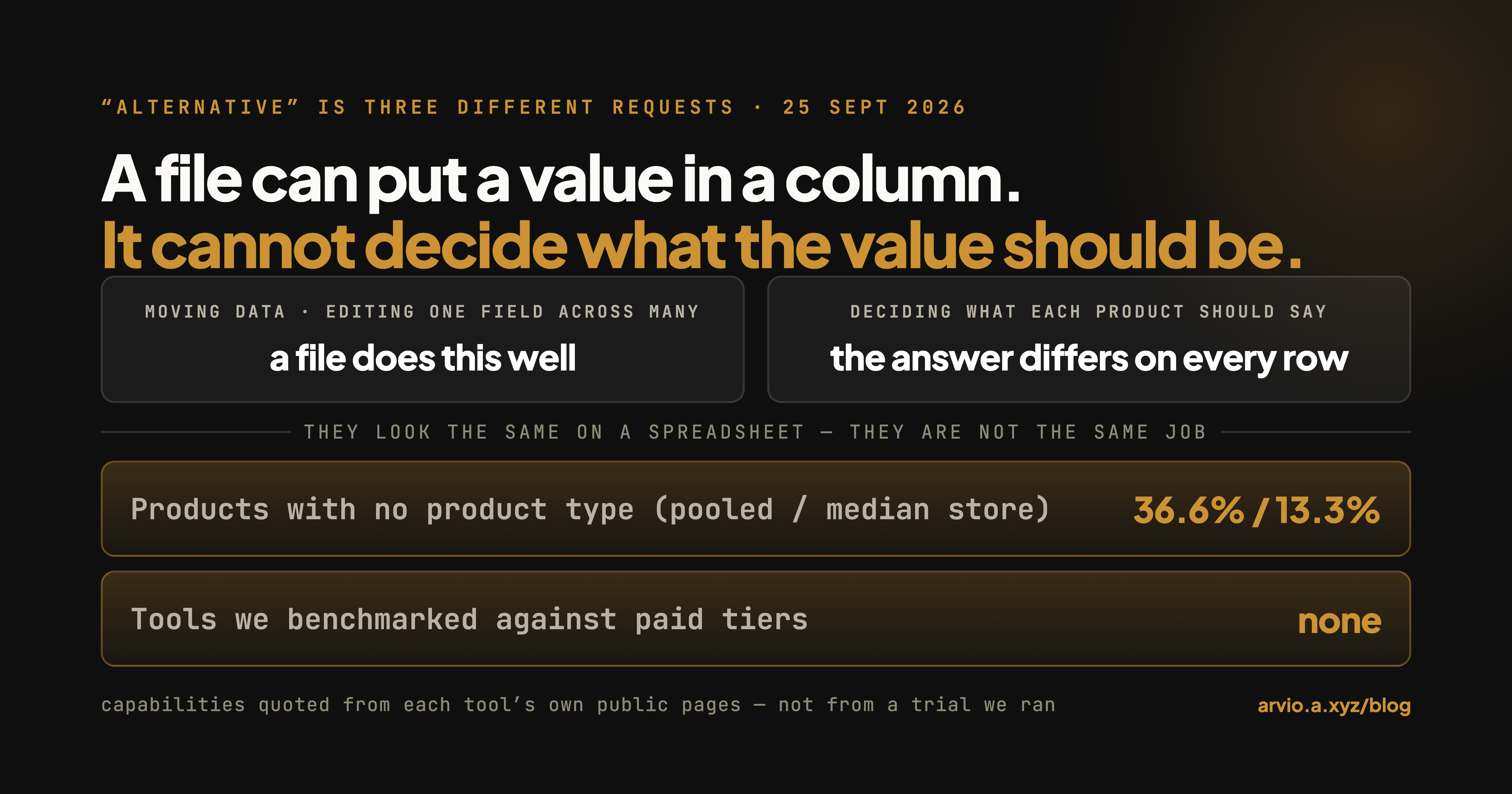
- "Alternative" usually means one of three different requests. Moving data. Editing a field across many products. Deciding what each product should say. They look similar on a spreadsheet and they are not the same job.
- The third one is where files run out. A file can put a value in a column for you; it cannot work out what the value should be for each product, because that answer is different for every row.
- Before you shop for anything, read your own catalogue. On the 41 stores we measured, the median store had 13.3% of products with no product type — but the pooled figure across all products is 36.6%, and the gap between those two numbers is the whole point of checking your own.
Different job, same catalogue
Arvio is an AI store operator: you tell it what you want, it reads your live catalogue, decides what each product needs, and drafts the change for you to approve. It does not move files.
Why you can trust us, and where we are interested
We build Arvio, a Shopify app. It is not an import/export tool and it is not competing with Matrixify for the migration job — we will say so again in the section where it matters. We have no commercial relationship with Matrixify and we are not a reseller of anything mentioned here.
What that means practically: on the jobs Matrixify is built for, we have no product to sell you, so the description below is just a description. On the third job, we do have something to sell, and that section is labelled.
Everything quoted about Matrixify in this article was read from its own public pages on 2026-09-25 — the App Store listing, its homepage and its pricing page. We have not run its paid tiers, so nothing here is a performance claim about it. Where we could not verify something, it is left out rather than guessed at.
The request splits three ways
People arrive at "Matrixify alternative" from very different places. Sorting yourself into one of these first will save you most of the shopping.
Job one: move data. Get products out of one system and into another, or out of Shopify and into a spreadsheet, or from a supplier's feed into your catalogue. Migration, backup, store-to-store copying, scheduled feeds.
Job two: change one field across many products. The vendor name is wrong on four hundred products. A collection of items needs a tag added. Prices go up 8% on one supplier's range and back down after a sale.
Job three: decide what each product should say. Three hundred descriptions are two lines long. Product type is blank on a third of the catalogue and no two products need the same value.
Job one and job two both end in a file. Job three cannot, and that is not a criticism of files — it is what a file is. A spreadsheet is very good at carrying a decision you have already made to a lot of rows at once. It has no view on what the decision should be.
Job one: moving data. This is what Matrixify is for.
This is the section where the honest answer is "you already have the tool."
Matrixify's own one-line description of itself is "Matrixify app helps you to manage store data - bulk import, export, update and migrate." (read 2026-09-25) Its listing names the capabilities directly:
Import and Export data using Excel, Google Sheets or CSV files.
Migrate from WooCommerce, WordPress, Magento, BigCommerce, Lightspeed, others.
Backup data, restore data. Copy data from store to store.
Schedule Export and schedule Import jobs, auto-repeat.
On its own homepage it lists the object types it handles: products, collections, customers, companies, discounts, draft orders, orders, payouts, pages, blog posts, redirects, activity, files, menus, metaobjects, metafields and shop data.
Two things there are worth pulling out, because they are the reason people reach for it rather than Shopify's built-in CSV.
Scope. Shopify's native product CSV moves products. The list above is considerably longer than that, and if the thing you need to move is redirects or metaobjects, the built-in export does not have a column for it.
File size. Shopify's own documentation states the native limit plainly: "Your product CSV can't exceed 15 MB." Matrixify's listing says it handles "files up to 20 GB" (read 2026-09-25). We have not tested that ceiling and are not vouching for it; we are noting that the constraint people hit with the native importer is a real constraint, and that this is the category of tool that addresses it.
There is a third one that matters more than it sounds. Shopify's CSV importer has a behaviour that catches people: "If a non-required column in the import CSV file is blank, then the matching value in the product list is overwritten as blank." A column that exists in your file but is empty will wipe the live value. And with the overwrite box unchecked, "the products that match an existing handle are ignored during CSV import" — so the safe-looking option is the one that silently does nothing. We wrote about what that does to a catalogue after an import goes wrong separately.
When you should stay on Matrixify, or go to something like it: you are migrating a store, you are backing one up, you are copying between stores, you are pulling a supplier feed on a schedule, or you need to move an object type that Shopify's native export does not cover. Those are the jobs it names on its own listing, and nothing in this article is an argument against using it for them.
When it is worth looking elsewhere for job one: if you are doing a one-time migration off a single platform, dedicated migration apps exist for exactly that shape and may be cheaper for a job you do once. We have not benchmarked them and are not naming a winner.
Job two: editing a field in bulk
This is the fuzzy middle, and it is where most of the "alternative" searching happens.
You can do job two with an import/export tool: export, edit the column in a spreadsheet, import it back. Matrixify's homepage describes this update path directly, saying the app lets you "update only fields you want to update, without the need to re-import everything" (read 2026-09-25). That is a real distinction from a full re-import and it is why the round trip works.
You can also do it with Shopify's own bulk editor, which handles a set of fields in a grid in the admin without any file at all. For a few hundred products and a field the bulk editor exposes, that is often faster than a round trip.
And there is a whole category of dedicated bulk edit apps built around this job specifically, usually with things a file round trip does not give you — filtered selections, scheduled changes, a preview of what will change, and a way back.
The honest guidance here is not a product name. It is one question: is the round trip the annoying part, or is the deciding part the annoying part?
If you know exactly what the new values are and the only tedium is getting them in, any of the three approaches work and you should pick on price and how often you will do it. If you are staring at the export wondering what to type in the column, no tool in this paragraph helps, because all of them are waiting for you to type it.
You have just seen where the spreadsheet stops
The column is easy to fill once you know what goes in it. Deciding what goes in it, product by product, against your own data, is the part a file cannot do for you. That is the part Arvio drafts, and every draft waits for your approval.
Job three: deciding what each product should say
This is the one we build for, so read this section knowing that.
The distinction is narrower than it sounds, and it is easiest to see on a single field. Take product type, a field that is blank on a lot of catalogues.
Filling it for one product is a decision — you look at the thing and you know what it is. Filling it for four hundred products is four hundred decisions, and they are not the same decision repeated. You cannot write one rule that covers a catalogue that has both a ceramic mug and a gift card in it. So the export comes back with four hundred blank cells, and the file has done everything it can do. The remaining work is the work.
That is the boundary. Matrixify moves the data in and out. Arvio decides what the data should say and drafts it for you. Neither one does the other's job, and an article that pretended otherwise would be easy to catch out.
Concretely, what that looks like: Arvio reads your live catalogue, works out what each product needs from the fields that are actually there — vendor, options, the copy you already wrote — drafts the change, and shows it to you before anything is written. You approve or you do not. We have written elsewhere about what it will not touch and what a description that does the work looks like when it is written against real product data rather than a template.
When you should not use us for this: if you already know what every product needs and it is the same value for all of them, the deciding part is dead weight and you want a bulk edit tool or a file. That is a real case and it is common.
A side-by-side, with the honest ticks
This table is about which jobs each shape of tool is built for, not which product is better. We have marked Matrixify from what its own public pages state.
| Matrixify | Shopify native CSV / bulk editor | Arvio | |
|---|---|---|---|
| Bulk import products from a file | ✓ | ✓ (products, 15 MB cap) | ✗ |
| Export the full catalogue to Excel / Sheets | ✓ | ✓ (CSV) | ✗ |
| Migrate from another platform | ✓ | ✗ | ✗ |
| Backup and restore | ✓ | ✗ | ✗ |
| Copy data store to store | ✓ | ✗ | ✗ |
| Scheduled / auto-repeating jobs | ✓ | ✗ | ✗ |
| Object types beyond products | ✓ (long list, see above) | partial | ✗ |
| Update individual fields without a full re-import | ✓ | ✓ (bulk editor, limited fields) | ✓ |
| Works out what the value should be per product | ✗ | ✗ | ✓ |
| Drafts the change and waits for approval | ✗ | ✗ | ✓ |
The bottom two rows are not marks against Matrixify. They are outside what it says it does, in the same way that "migrate from Magento" is outside what we do. A tool is not worse for having a scope.
We have deliberately not put pricing in this table. Plans and limits change, and a stale price in a comparison table is worse than no price — go and read each vendor's current pricing page.
Read your own catalogue before you shop
Whichever job you are in, the size of it is knowable before you spend anything, and it is the one number that should drive the decision.
In August 2026 we read 41 live Shopify storefronts — 20,604 products — through the public /products.json endpoint that any browser can fetch. The stores came from a public list: the Shopify Community's Store Feedback board, where owners post their own URLs asking for reviews. No store is named here.
Here is the part that matters for your decision, and it is why we are giving you two numbers for every row rather than one:
| What we measured | Across all products | Median store |
|---|---|---|
| Product type blank | 36.6% | 13.3% |
| Tags blank | 19.9% | 7.7% |
| Description under 200 characters | 21.4% | 1.4% |
| One image or none | 34.6% | 14.8% |
| Title over 60 characters | 13.6% | 2.0% |
Read the left column on its own and you would conclude every store has a description problem. Read the right column and most do not — the typical store has 1.4% thin descriptions, while the pooled figure is 21.4%, because a small number of large catalogues carry most of the affected products. Both numbers are true. Only one of them is about you.
Whether it looks like you. Stores that ask for feedback on a public board skew newer and smaller, and the stores were drawn from that board's list with a fixed random seed, so this is a random sample of that list and not of Shopify at large. The median store here is smaller than the average catalogue we get asked about.
How to check yours in five minutes, without installing anything. Open https://yourstore.com/products.json?limit=250 in a browser. You will get one very long line of JSON — that is normal and it is the wall most people hit. Rather than reading it, use your browser's find (⌘F or Ctrl-F) and count matches for "product_type":"" and for "tags":[]. Those two counts, against the number of products actually in that response, give you your own version of the table above. One request returns at most 250 products, so if your catalogue is larger, add &page=2, &page=3 and so on and add the counts up — otherwise you are measuring your first 250 products and calling it your catalogue. If your numbers look like the median column, the job is an afternoon and you do not need to buy anything. If they look like the pooled column, you have a real project and it is worth picking the right shape of tool for it.
Three real situations
"We're moving off WooCommerce next month." Job one. An import/export tool or a dedicated migration app. Nothing in job three is relevant until the products are actually in Shopify, and buying for it now is buying early.
"The supplier changed their naming and now 300 vendor fields are wrong." Job two, and the cleanest case for a round trip: you know the old value, you know the new value, and a find-and-replace in a column does it. Export, edit, import back.
"Product type is blank on a third of the catalogue." Job three. The export will tell you which ones, which you could also learn with the ⌘F count above. It will not tell you what to put in them, and neither will an empty column.
FAQ
Is Matrixify good?
For the jobs it describes on its own listing — bulk import, export, migration, backup, scheduled jobs — it is a well-established app in that category with a long-standing presence on the App Store. We have not run its paid tiers, so we are not rating it on performance. If your job is moving data, it belongs on your shortlist.
Do I need an alternative to Matrixify at all?
Often not. If you are here because an import felt harder than it should have, the problem is sometimes the file rather than the tool — particularly the blank-column behaviour described above. If you are here because the tool did its job and you still have work left, you are probably in job three, and that is not a like-for-like replacement.
Can Arvio import my products from a CSV?
No. It is not an import/export tool. If you need data moved into Shopify in bulk, use something built for that — Matrixify among them.
What is the cheapest way to do a one-off bulk edit?
Shopify's own bulk editor, if the field you need is one it exposes, costs nothing extra. For fields it does not expose, an export-edit-import round trip on an entry tier of an import tool is usually the next cheapest. Check current plan limits with the vendor.
Why does the pooled percentage differ so much from the median store?
Because catalogue sizes vary enormously. A single store with thousands of thin descriptions moves the pooled number a long way and leaves the median untouched. Any comparison article quoting only a pooled figure is telling you about the biggest store in its sample, not about yours.
Is /products.json safe to open on my own store?
It is a read-only public endpoint that any browser can fetch, and opening it changes nothing. It shows published products only, so the counts you get are for your live catalogue rather than drafts.
Can I use Matrixify and Arvio together?
Yes, and that is the arrangement we would expect for a store doing both jobs — one moves the data, the other decides what it should say. They do not overlap.
What we still do not know
We have not run Matrixify's paid tiers against a large catalogue, so nothing here is a performance or reliability claim about it; the descriptions come from its own public pages, read on 2026-09-25. We have not benchmarked the dedicated bulk edit apps or migration apps mentioned by category, which is why none of them are named or ranked. And the 41-store figures above come from a seeded random draw on one public board — they are useful for showing how far pooled and per-store numbers diverge, and they are not a Shopify-wide benchmark.
Arvio: AI Store Operator — install it on the Shopify App Store. Keep Matrixify for moving the data; this is for deciding what the data should say.